Table of Content
Cold outreach is still a solid way to land B2B clients and get sales calls on the calendar. The way people run these campaigns now is completely different from a few years back. Providers locked down security, dialed up the filters, and made authentication rules strict enough that small slip-ups can hurt your email deliverability almost overnight.
Create a dozen brand-new addresses and start sending, and most of those emails will land in spam or get blocked before you even finish the first sequence.
Older accounts with some history fix that. They give you the inbox placement that fresh accounts simply don't have anymore.
Why Fresh Email Accounts Struggle With Cold Outreach
Google, Yahoo, and Microsoft process billions of messages a day. Their filters exist to block spam, phishing, and automated abuse. Because spammers open thousands of temporary accounts daily, new email addresses get treated with immediate caution.
When a brand-new Gmail account suddenly starts sending 40–50 emails a day to people who have never interacted with it, the security algorithms pick up on the pattern and flag it.
The Main Problems For New Accounts
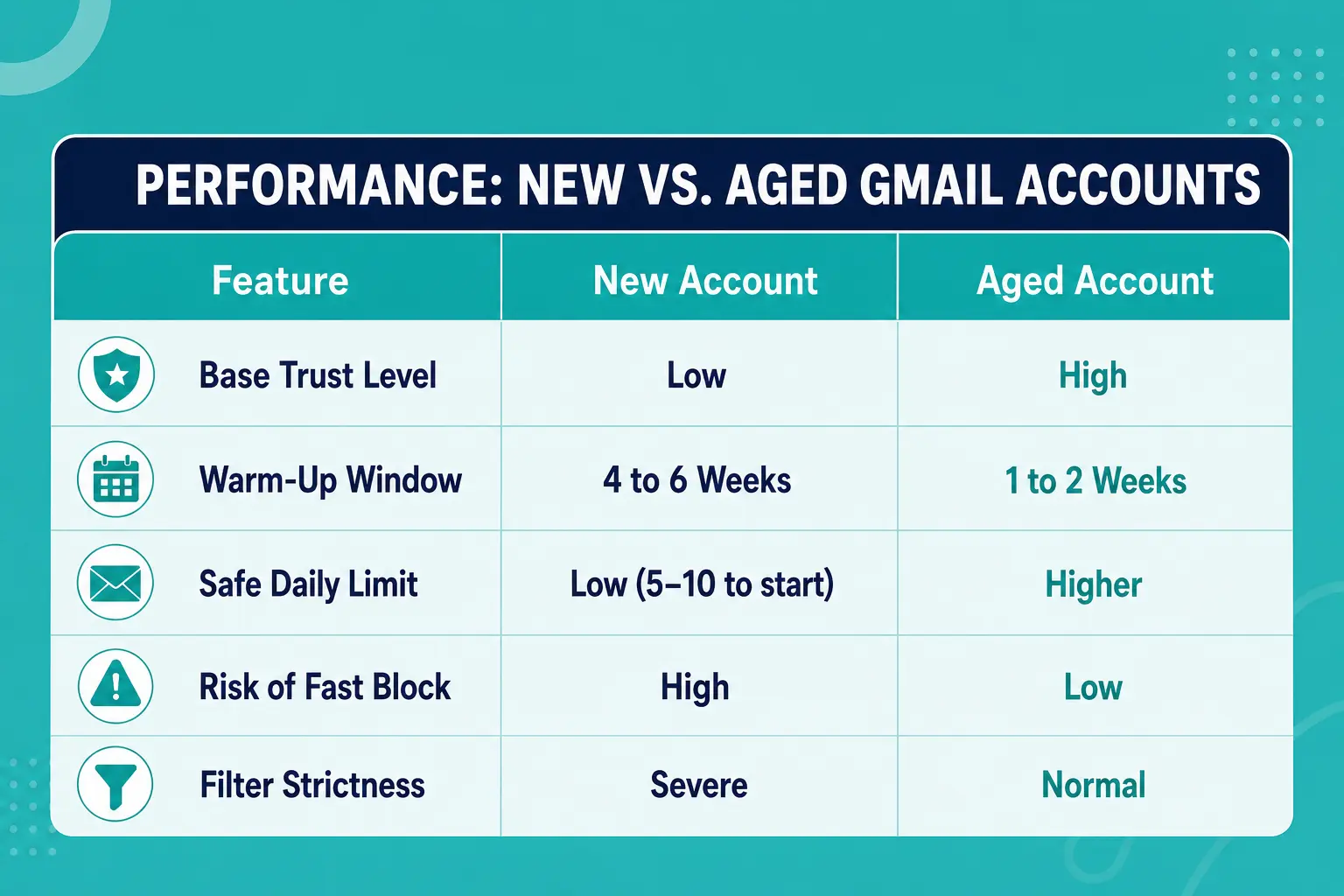
- ○ No reputation history: Mail servers have zero previous data to figure out if you are a legitimate business or a spammer.
- ○ Low sending limits: Ramping up a brand-new domain takes 4 to 6 weeks of sending 5 to 10 emails a day before reaching normal outreach volume.
- ○ Filter sensitivity: Spam filters evaluate new accounts using strict content, link, and volume rules.
- ○ Strict complaint thresholds: Google and Yahoo enforce a strict spam complaint ceiling of 0.3%. In practice, going over 0.1% causes immediate inboxing drops. A single spam click on a low-volume new account damages its reputation.
Waiting two months just to warm up a set of new addresses costs time and slows down sales revenue. Because of this delay, sales teams often choose to buy old Gmail accounts so they can bypass the slow setup period and launch campaigns much faster.
What Makes An Aged Gmail Account Different?
An aged Gmail account is an address created months or years ago that has established records on Google's servers.
Google evaluates accounts using age, past activity, and account stability over time. Spammers rarely keep accounts idle for years without using them or getting caught. Because of that pattern, older accounts start with built-in trust from mail filters.
When an aged account sends a message, spam algorithms evaluate it under a standard risk profile rather than an aggressive abuse profile. The security system treats the sender as a legitimate user engaged in everyday communication, which helps messages land in the main inbox rather than the spam folder.
To see how account age fits into broader sales outreach, read our guide on how to scale business with Gmail.
Benefits Of Aged Accounts For Sales Teams
Higher primary inbox placement
Getting into the primary inbox is the hardest part of email outreach. Recent industry benchmark data shows that average cold email reply rates sit around 3.4% on managed sending setups, while unmanaged setups drop below 0.5% because messages get filtered out.
Aged accounts carry existing account trust. When paired with proper domain authentication, they deliver a higher percentage of emails straight to the primary inbox.
Shorter Warm-Up Schedules
Every email account needs a warm-up phase, but the timeline varies depending on account age:
- ○ New accounts: Require 4 to 6 weeks of slow volume increases to avoid sending spikes.
- ○ Aged accounts: Can reach regular daily sending targets in 7 to 14 days of gradual activity.
Cutting the ramp-up time by several weeks lets you test copy, reach prospects, and fill your sales pipeline much quicker.
Protection Against Minor Deliverability Hits
Even well-targeted sales emails occasionally get marked as spam. If a new account receives two spam flags out of 50 sends, its sender reputation drops quickly. Aged accounts have historical activity that absorbs minor negative signals without triggering an automatic account ban.
For a detailed breakdown of how aged assets improve outreach infrastructure, review the benefits of using old Gmail accounts.
Technical Reasons Google Trusts Older Accounts
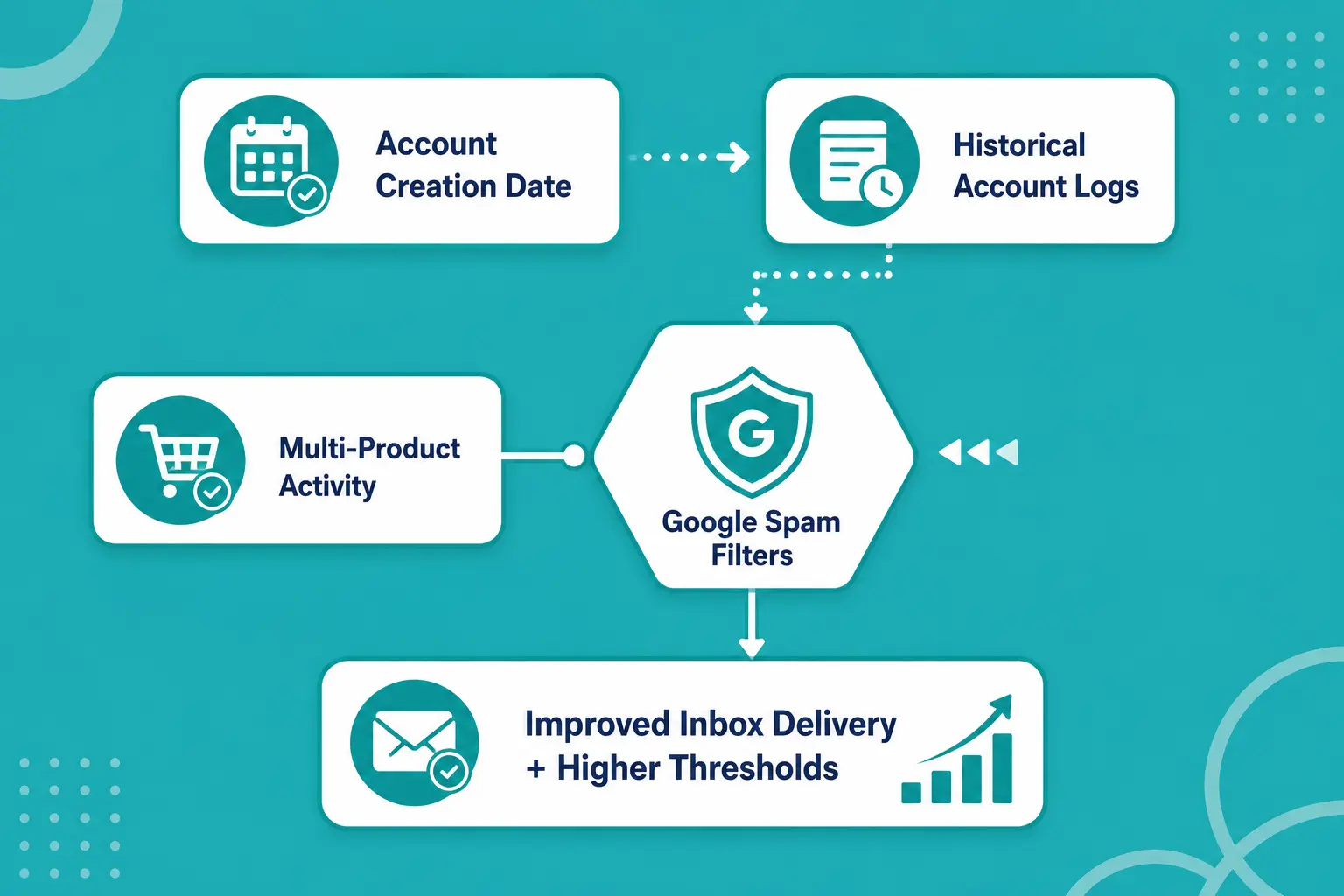
Understanding why old accounts perform better comes down to looking at the signals Google monitors in the background:
Registration Timestamps
Account creation dates are a core signal in Google's security systems. Accounts created years ago have passed through multiple spam updates, security patches, and automated checks. This history gives them higher baseline reputation scores than fresh registrations.
User Activity Patterns
Many aged accounts contain real user history, such as incoming emails, account verifications, third-party logins via Google OAuth, and activity across YouTube or Drive. Security algorithms recognize this pattern as natural human behavior.
IP Address Stability
Accounts with established login records across normal IP ranges don't trigger the security flags that clean, batch-generated accounts cause when logged in through new software setups.
These technical factors explain why growth teams frequently decide to buy aged gmail accounts to keep their outreach infrastructure stable over time.
How To Set Up An Outreach Campaign With Aged Accounts
Using aged accounts is an advantage, but you still need a clean operational setup to protect your assets.
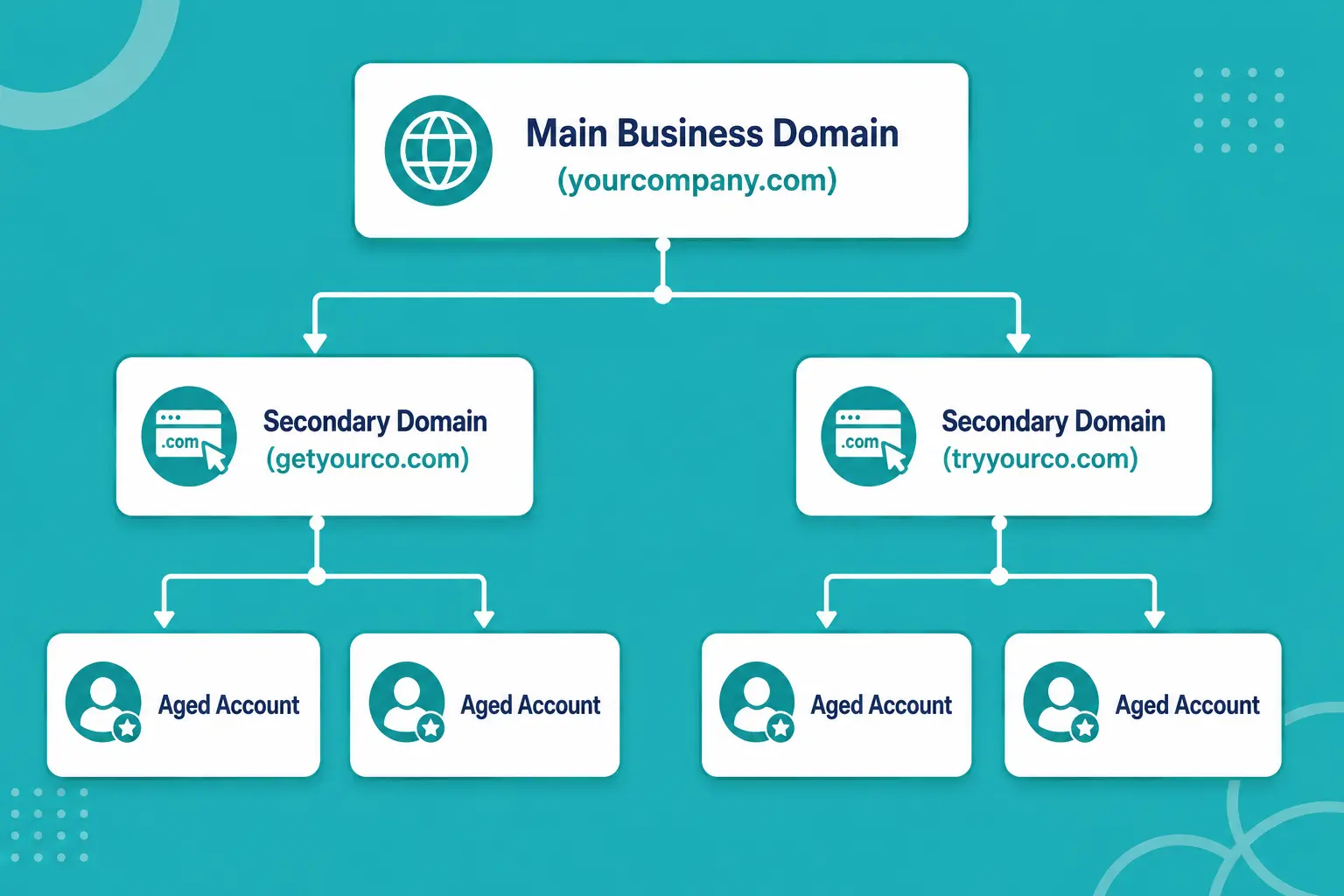
Isolate Your Main Domain
Never send cold emails from your primary company domain. If an outreach campaign hits deliverability trouble, you don't want your everyday business emails, client updates, and internal communications landing in spam folders.
Register secondary domain variations (such as getyourcompany.com instead of yourcompany.com) and connect your outreach accounts to those auxiliary domains.
Distribute Sending Volume Across Multiple Inboxes
Sending 500 emails a day from a single account is a fast way to get blocked, no matter how old the account is. Spread that volume across multiple aged accounts instead.
- ○ Risky setup: 1 account x 500 emails per day = High risk of account suspension.
- ○ Balanced setup: 10 aged accounts x 50 emails per day = Low risk, consistent inbox delivery.
Distributing your volume keeps daily activity well within Google's normal threshold limits.
Configure Technical DNS Records
Every sending domain must have proper authentication records added to its DNS configuration:
- ○ SPF (Sender Policy Framework): Declares which mail servers are permitted to send emails for your domain.
- ○ DKIM (DomainKeys Identified Mail): Adds a digital signature to your emails to verify the sender identity.
- ○ DMARC (Domain-based Message Authentication): Defines how receiving servers should handle emails that fail SPF or DKIM checks.
Without these three records configured correctly, even old accounts will run into delivery failures.
Best Practices For Daily Outreach Execution
Good account infrastructure gets your emails delivered, but your campaign management decides how long those accounts stay active.
Ramp Up Volume Gradually
Even with an aged account, avoid jumping straight to maximum volume on day one. Start with 10 to 15 emails per day per account. Increase the count gradually over two weeks until you reach your steady target of 30 to 50 cold emails per address each day.
Avoid Exact Template Repetition
Spam filters monitor body text for identical patterns sent across hundreds of recipients. If you send the exact same text with only a name tag changed, filters recognize the template pattern quickly.
Use custom variables, vary your phrasing across templates, and keep subject lines plain and straightforward. Leave out heavy marketing buzzwords, excessive link counts, and sales attachments.
Track Account Health Weekly
Monitor open rates, reply rates, and bounce rates for every individual account:
- ○ Reply rate: Healthy campaigns average 3% to 5% replies, with elite setups hitting 8% to 12%.
- ○ Bounce rate: Keep total bounces under 2%. Higher rates damage your domain reputation quickly.
- ○ Spam complaints: Keep complaints below 0.1% using Google Postmaster Tools.
If an account's delivery numbers drop, pause sending on that address immediately, check your prospect list hygiene, and re-warm the address before putting it back into production.
For more context on integrating aged assets into a long-term growth plan, read our post on why old Gmail accounts are ideal for marketing business growth.
Mistakes That Hurt Outreach Performance
Avoid these common mistakes to protect your sending infrastructure and maintain inbox placement:
- ○ Sending too many emails per inbox: Google allows high daily sending caps on Workspace accounts, but cold outreach behaves differently than internal mail. Keep cold emails under 50 per day per account.
- ○ Using unverified prospect lists: High bounce rates damage account reputation faster than almost anything else. Run every list through an email verification service before launching your sequence.
- ○ Managing multiple accounts on a single IP: Logging into dozens of accounts from the same IP address can trigger security locks across the entire set. Use clean residential proxies or specialized multi-account software to keep logins isolated.
- ○ Forgetting opt-out links: Make it easy for prospects to decline further emails. When recipients cannot find an opt-out link, they hit the spam button, which directly harms your complaint rate.
Conclusion
Getting consistent replies from cold outreach usually comes down to three things: the domain being set up right, the message actually mattering to the person, and the account itself having some built-up trust. Aged Gmail accounts help a lot with that last piece because they already skip the low-trust window that brand-new addresses get stuck in.
Bulk Accounts is a place you can buy Gmail accounts if you don't want to spend weeks warming up new ones. Use aged accounts from a solid supplier, set up SPF, DKIM and DMARC properly, keep your list clean, and stick to safe daily limits. That's usually enough to get more emails into the primary inbox and keep replies coming in steadily.
Frequently Asked Questions
How Long Does An Aged Gmail Account Need To Be Warmed Up?
New accounts usually need 4-6 weeks of careful warming. Aged ones are faster. Most only take 7-14 days. Still start light, 10 to 15 emails a day, then slowly raise the volume. Big jumps can set off activity flags.
How Many Cold Emails Can I Safely Send Per Account Each Day?
Google's normal limits are higher, but cold outreach is different. Stay in the 30-50 range per account if you want to keep deliverability healthy. Sending 500 a day? Split it across 10-15 accounts instead of loading everything onto one.
Will Using Aged Gmail Accounts Guarantee My Emails Avoid The Spam Folder?
Age helps a lot with the starting trust score, but it is not a guarantee. You still need proper SPF, DKIM and DMARC, a clean list with low bounces, and copy that does not look spammy or repeat the same template over and over.
Should I Connect Aged Accounts Directly To My Primary Company Domain?
No. Always connect outreach accounts to secondary domain variations (like getyourcompany.com instead of yourcompany.com). Isolating your cold outreach protects your main domain's reputation, ensuring your day-to-day business communication and client updates are never affected.
Why Do I Need Proxies Or Multi-Account Management Tools For Bulk Accounts?
Logging into multiple accounts from the same IP address at the same time makes them look linked to automated tools. Using dedicated residential proxies or multi-account software keeps each account's browser environment and IP location isolated, preventing group suspensions.