Table of Content
We all know that if your emails are not being delivered to your recipient’s inbox, then there’s no point in doing anything else.
This is where deliverability comes into play. With high bounce rates, low inbox placement rates, and poor results with email marketing, aged Gmail accounts can revolutionize your business.
Gmail treats brand-new accounts with serious skepticism. But an account that's been around for months? Different story. Old accounts carry weight, reputation, and trust signals that new ones don't. This guide shows you how to use aged Gmail accounts to dramatically improve your email success.
Understanding Email Deliverability and Its Importance
What Email Deliverability Actually Means
Email deliverability isn't just technical delivery. It's landing in the inbox where someone sees it. Your email could reach Gmail's servers but land in spam, where nobody looks. That's why inbox placement is the real metric.
Key Metrics That Matter
Email bounce rates are one indicator. More happens behind the scenes:
- ○ Hard bounces happen when email addresses don't exist
- ○ Soft bounces are temporary issues (full mailbox, server problems)
- ○ Spam complaints damage your reputation immediately
- ○ Open and click rates show if recipients care
- ○ Unsubscribe rates indicate content relevance
Why This Matters
When email deliverability is bad, you waste money sending emails nobody sees. Each spam report damages your sender's reputation. ISPs constantly evaluate: Is this legitimate? Do people want these emails? What's the sending history?
One bad campaign haunts you for months.
Why Aged Gmail Accounts Boost Email Deliverability
The Trust Factor
Think about buying from a store you've never been to versus one that's been around for 20 years. Which do you trust more?
Gmail thinks the same way. An account's reputation built over time signals legitimacy. When you've sent consistently for a year without complaints, Gmail filters treat you differently.
The benefits of Aged Gmail accounts are real because:
- ○ Long sending history proves you're not a spammer
- ○ Consistent patterns show legitimate operation
- ○ Low complaint rates accumulate over time
- ○ Engagement data builds trust
A trusted email sender with two years of history can do what new accounts cannot.
Real-World Difference
The gap between new and old accounts is significant:
- ○ New account: 45-60% inbox placement
- ○ 3-month account: 70-80% inbox placement
- ○ 12+ month account: 85-95% inbox placement
If an email generates $0.50 in value, jumping from 60% to 90% inbox placement means going from $0.30 to $0.45 per email. That's 50% more revenue.
Strategies to Create and Maintain Aged Gmail Accounts
Setting Up Properly
Creating aged Gmail accounts requires more than hitting "create":
- ○ Add a real profile photo (not a placeholder)
- ○ Include legitimate recovery information
- ○ Enable two-factor authentication
- ○ Write an actual profile bio
- ○ Link to other Google services you'll use
Make it look like a real person set it up for legitimate reasons. Don't rush this part.
Warming Up Accounts
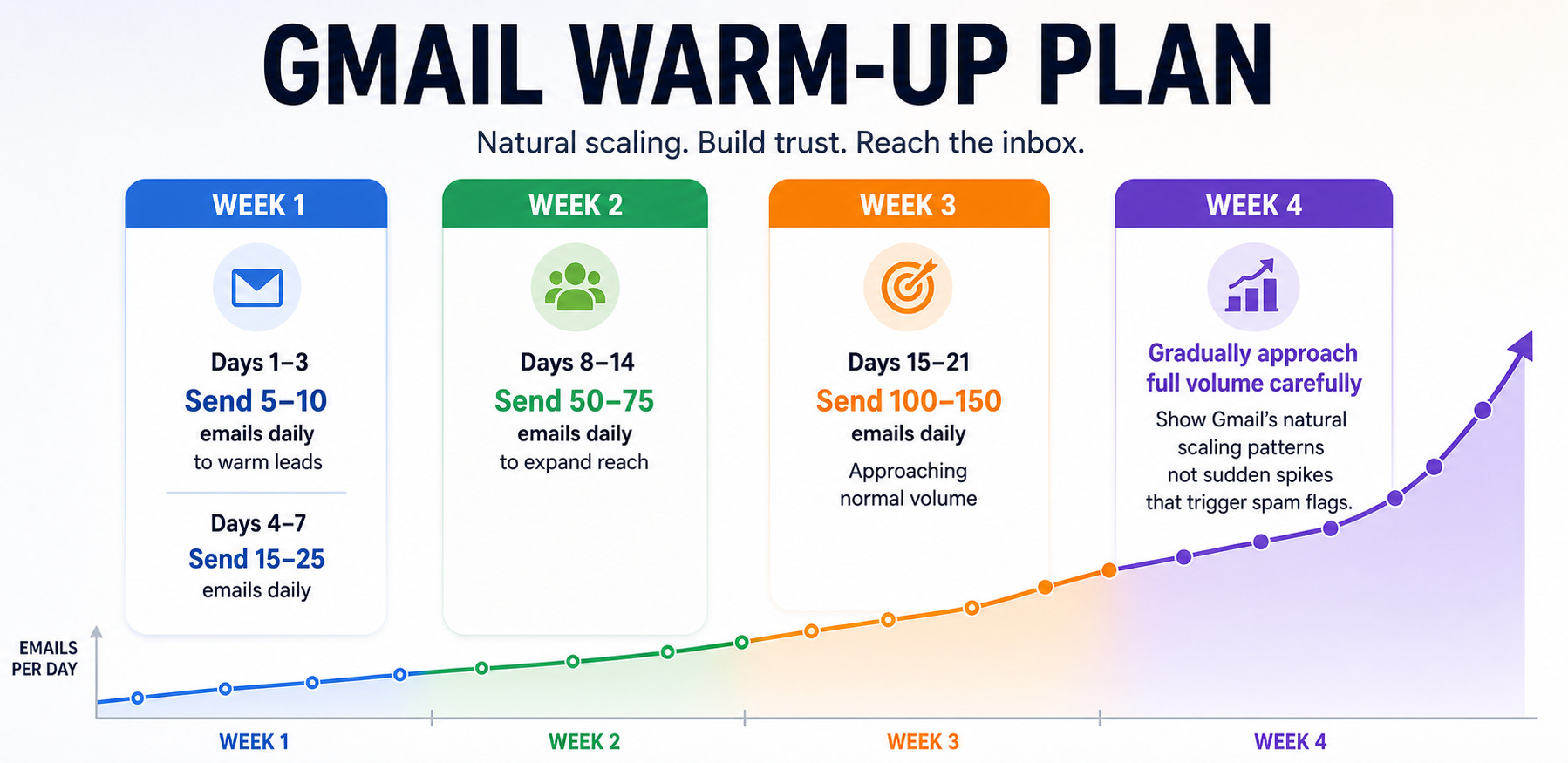
Warming up email accounts is critical. Even-aged accounts need a gradual ramp-up to signal legitimate sending patterns to Gmail's system.
Keep It Real
Account activity simulation means varied use between campaigns:
- ○ Check and reply to emails regularly
- ○ Create Drive documents
- ○ Add Calendar events
- ○ Browse YouTube occasionally
- ○ Normal Google Search activity
Don't only use it for sending bulk emails. Mix in actual usage patterns.
Maintain Reputation
Maintaining account reputation requires ongoing attention:
- ○ Monitor engagement metrics
- ○ Keep sending consistent
- ○ Clean lists quarterly
- ○ Engage with replies
- ○ Vary subject lines and content
- ○ Verify authentication (SPF, DKIM, DMARC)
Best Practices for Using Aged Gmail Accounts
Know Your Email Sending Limits
Email sending limits vary by account age:
- ○ New account: 100-500 emails per day
- ○ Three months old: 500-2,000 emails per day
- ○ 12+ months old: 5,000-10,000 emails per day
These exist to stop spam. Stay conservative and scale slowly.
Engagement Is Everything
Consistent engagement separates winners from spam folders. You can't just send to everyone equally:
- ○ Most engaged subscribers get more emails regularly
- ○ Less engaged subscribers get fewer emails
- ○ Inactive subscribers get removed after re-engagement attempts
Try different subject lines constantly. Respond when people reply to emails. Keep content fresh and valuable. Track what's working and adjust.
Avoid Spam Triggers
Avoiding spam triggers means being smarter about how you send:
Don't do this:
- ○ Send 10+ links when 5 would work fine
- ○ Use massive file attachments
- ○ Write everything in HTML only, without plain text
- ○ Use fake or misleading sender names
- ○ Overuse URL shorteners that hide links
- ○ WRITE IN ALL CAPS CONSTANTLY
- ○ Mislead with subject lines that don't match the body
- ○ Send only images with no text content
Use Personalization
Personalization in emails dramatically improves results. It takes effort but works:
- ○ Use recipient names in greeting
- ○ Reference something about them specifically
- ○ Customize offers based on their profile
- ○ Ask questions that invite responses
- ○ Make it feel like one person to another
Personalized emails get 35-50% opens. Generic blasts get 15-20%. That's a massive difference in success rates.
Tools to Monitor Email Deliverability
Check Your Authentication
Before sending any campaigns, verify your authentication setup is correct:
- ○ Google Admin Toolbox – Verify DKIM and SPF records are configured properly
- ○ MXToolbox – Check DNS records and see your sender reputation score
- ○ Email Header Analyzer – Examine email authentication headers in detail
This takes just 10 minutes but can save your entire campaign.
Test Inbox Placement
Send test emails across different providers (Gmail, Outlook, Yahoo). Check where they land. Adjust based on what you find.
Services like 250ok do this professionally, but you can test for free with accounts you create.
Check Spam Scores
- ○ Mail-tester.com – Send test email and get spam scores
- ○ IsNotSpam – Tests across multiple providers
- ○ Validity – Enterprise option for serious testing
Anything above 5 needs fixing before sending your campaign.
Track Performance
Monitor weekly for issues:
- ○ Delivery rate – Percentage successfully delivered
- ○ Bounce rate – Hard and soft bounces combined
- ○ Open rate – Percentage of recipients opening emails
- ○ Click rate – Engagement through link clicks
- ○ Complaint rate – Spam reports you're receiving
Conclusion
Email deliverability is the foundation of everything in email marketing. Without it, your best campaigns fail.
Aged Gmail accounts work because ISPs have real data showing they're legitimate senders. It's not a hack—it's how the system actually works. Established senders with track records get better treatment than unknowns.
When you combine account maturity with proper warm-up, consistent engagement, and smart content, you build a system that works. Your email marketing success improves. Your inbox placement jumps. Revenue goes up.
Stop treating email deliverability like an afterthought. Make it central to your strategy. Use aged accounts from Bulk Accounts, follow best practices, monitor metrics, and watch your campaigns actually work. Bulk Accounts provides pre-aged Gmail accounts already established with sender reputation, eliminating the waiting period and letting you launch campaigns immediately with a trusted status.
Frequently Asked Questions
How do aged Gmail accounts improve email deliverability?
Aged accounts have established sender history and reputation with Gmail, which means better inbox placement automatically. Gmail filters trust them more because they've proven they send legitimate emails, not spam.
Are aged Gmail accounts better for cold emailing than new accounts?
Completely. Aged Gmail accounts get ISP preference and trust that new accounts don't, meaning cold emails have better chances at the inbox instead of spam. You need that advantage for cold outreach to work.
How many emails can be sent daily from an aged Gmail account?
It depends on age: new accounts get 100-500/day max, 3-month accounts get 500-2,000/day, and 12+ month accounts can do 5,000-10,000/day. Always stay well under your limit.
Do aged accounts still require a warm-up before bulk sending?
Yes, absolutely. Even-aged accounts need 10-14 days of gradual warm-up before ramping volume. Gmail flags the sudden spike as suspicious. Don't skip this step.
How does Bulk Accounts provide high-quality aged Gmail accounts for businesses?
Bulk Accounts sells pre-aged accounts (6-12+ months old) with real sending history, eliminating months of waiting. You get trusted email sender accounts ready to use immediately.
How does Bulk Accounts ensure aged Gmail accounts are reliable and safe?
They verify each account, monitor reputation continuously, ensure compliance, add security features, and test performance before delivery. Every account maintains inbox placement standards.
Can Bulk Accounts provide accounts in bulk for large-scale campaigns?
Yes, they handle bulk orders with volume discounts, account customization, staggered delivery, and account diversity. They supply 10 to 500+ accounts as needed.