Table of Content
If you're trying to grow online, you need steady outreach, more than one channel, and email that actually works. Running a marketing agency, managing local listings, or doing cold sales with just one inbox gets messy fast. Trying to create dozens of accounts yourself is even worse.
Sending limits, phone verification loops, and spam filters make the whole process slow and frustrating. Buying Gmail accounts in bulk skips most of that. You get accounts that work right away, your main domain stays safer, and you can scale without constantly hitting walls.
This piece covers why verified Gmail accounts help with growth, why older ones perform better, and how to set them up so deliverability holds up over time.
1. Eliminate Setup Bottlenecks and Save Valuable Time
Setting up one or two email addresses is simple. Creating 20, 50, or 100 accounts for a growing sales or marketing team is not. Google watches registration patterns closely. Trying to create multiple profiles from the same location or IP often triggers phone verification, temporary blocks, or suspensions.
Buying bulk accounts from a reputable provider skips most of these headaches:
- ○ Instant operational access: You get fully verified login credentials, so your team can start outreach without waiting days or weeks.
- ○ No phone verification barriers: You avoid running out of phone numbers or hitting Google's limits during campaign setup.
- ○ IP diversity during account creation: Better providers use residential proxies when they create the accounts, so Google is less likely to flag them from the start.
- ○ Focus on revenue work: Instead of wasting time on recovery emails, CAPTCHAs, and phone codes, your team can actually work on getting clients and closing deals.
2. Protect Your Primary Domain Reputation
One costly mistake is running large-scale cold outreach or aggressive campaigns from your main corporate domain (like sales@yourcompany.com).
Cold email campaigns often see deliverability shifts. Higher bounce rates or spam complaints can lower your primary domain's sender score. Once that happens, everyday messages, client proposals, invoices, support replies, and internal communication can land in spam folders.
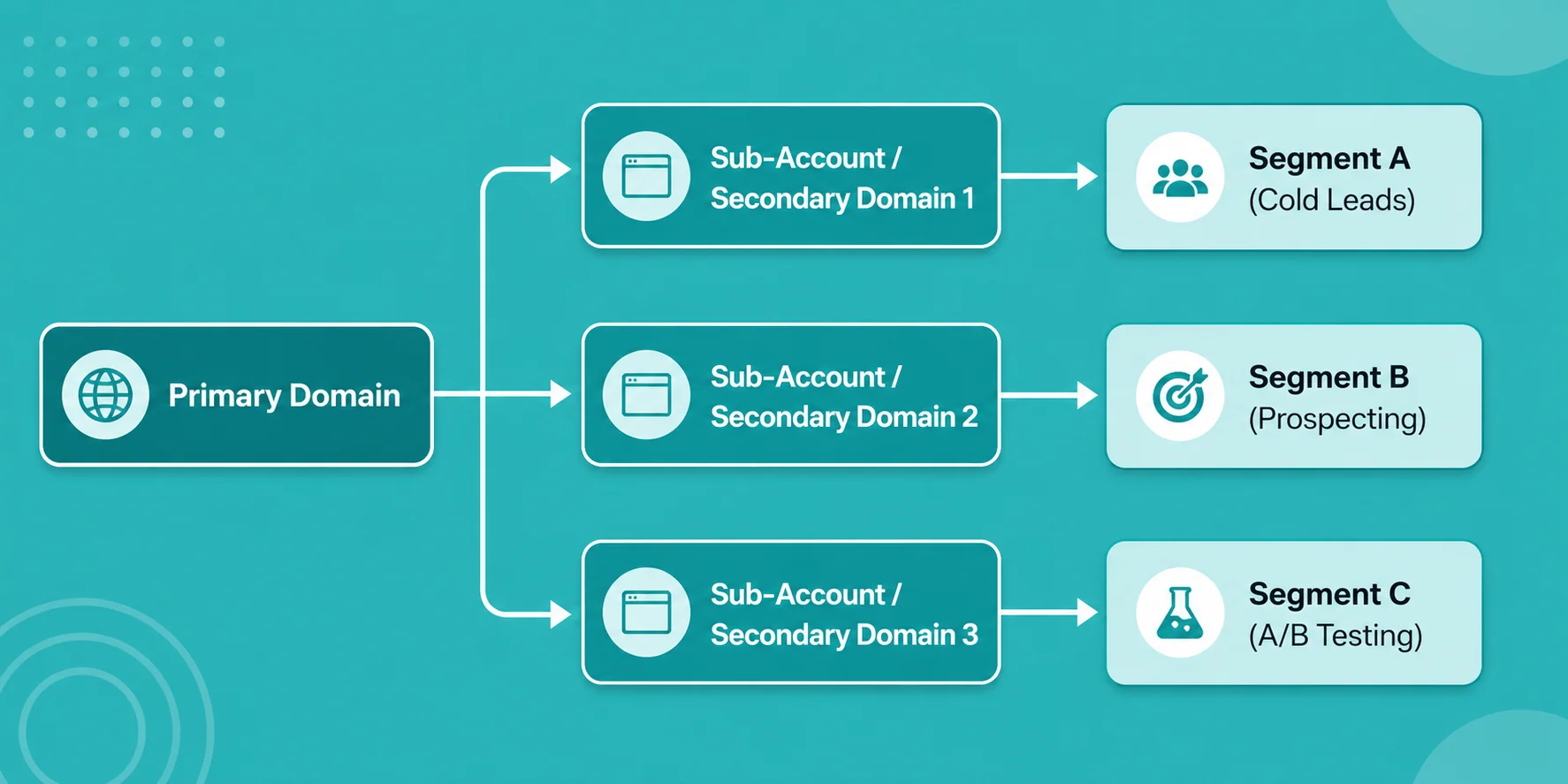
A safer approach uses domain diversification and inbox rotation. Buying bulk accounts lets you spread outgoing volume across secondary accounts and satellite domains. Sending 500 emails a day across 15 accounts (about 30–35 per account) usually performs better than pushing everything through one inbox. If one account has problems, your main company domain stays unaffected.
3. Leverage Aged Accounts for Superior Email Deliverability
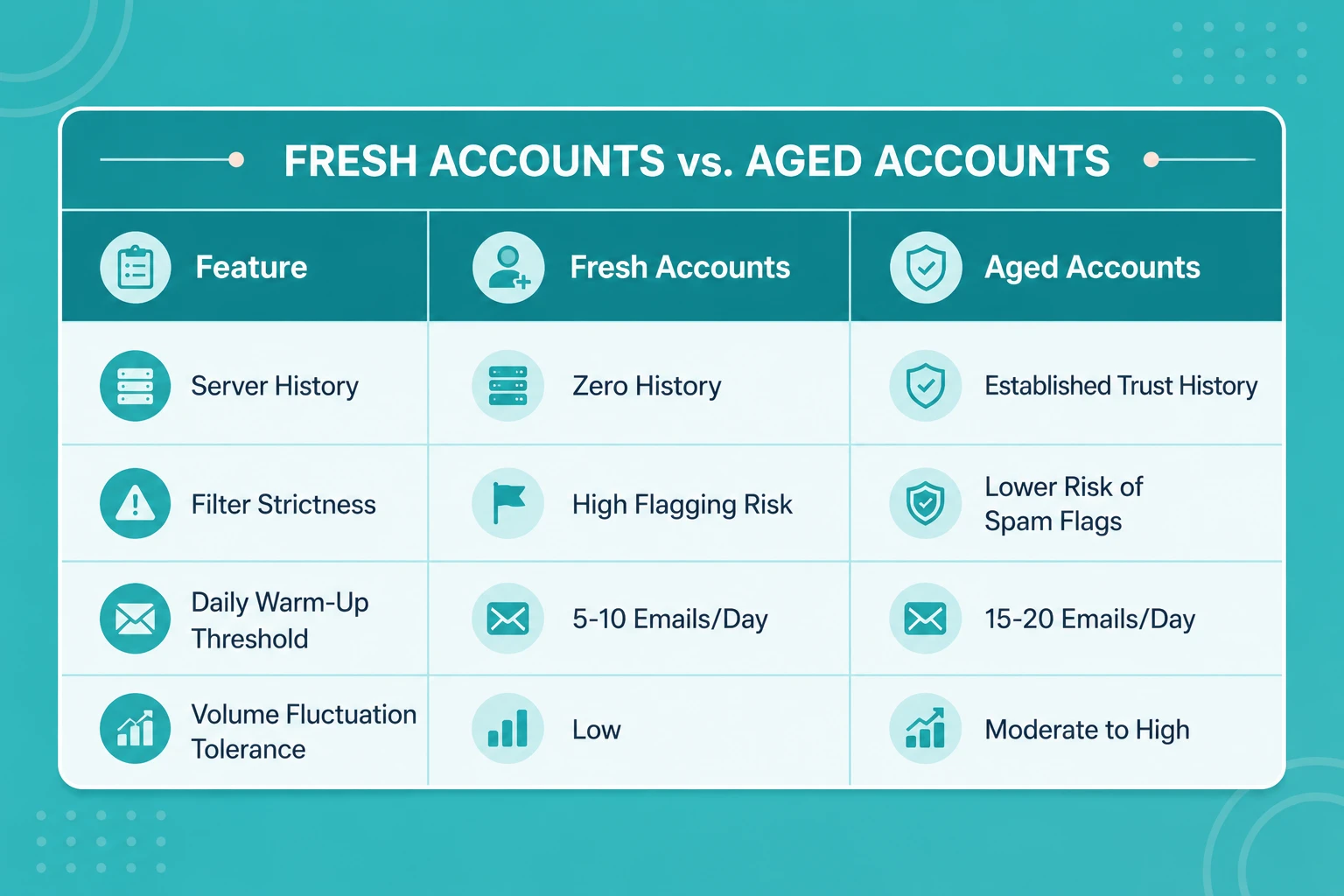
Not all accounts perform the same for cold outreach. Brand-new profiles face stricter filtering. Sending dozens of cold messages on day one often looks suspicious to spam filters and lands messages in spam or promotions tabs.
Key advantages of aged accounts
- ○ Built-in server reputation: Older accounts already have history on Google's systems, which usually means higher initial trust and better inbox placement.
- ○ Higher starting limits: They can handle larger volumes earlier in the warm-up process with fewer security checks.
- ○ Greater resilience: An aged account handles an unexpected spam report better than a newly created one.
For a deeper look into why account age impacts campaign longevity, review how old Gmail accounts are ideal for marketing and business growth.
4. Expand Multi-Channel Operations Across Your Organization
Cold email is a common reason to buy Gmail accounts, but bulk Google accounts support other areas too:
A. Search Engine Optimization (SEO) & Link Building
Link-building specialists and SEO agencies often need separate email personas for guest post pitches, resource page outreach, and broken link work. Distinct verified identities reduce prospect fatigue and keep campaigns organized across niches.
B. Google Business Profile & Local SEO Management
Agencies managing local listings for clients frequently need separate Google profiles for reviews, updates, and verification. Keeping profiles segmented avoids cross-account flags and keeps client assets separate.
C. Social Media Management & Digital Advertising
Platforms like Google Ads, YouTube, and Facebook usually need their own verified email. Keeping each one separate means if one account gets restricted, the others don't go down with it.
D. E-Commerce & Customer Service Segmentation
A lot of growing online stores split things up one email for returns, another for suppliers, another for regular customer questions. It keeps the workload clearer and stops everything from piling into the same inbox.
To learn more about practical scaling models for agency and enterprise growth, explore how to scale your business with Gmail.
5. Implement a Sustainable Outreach System
Buying bulk accounts gives you the accounts. Keeping good deliverability over time still comes down to basic email hygiene and how you manage them day to day. Here's what actually helps:
Step 1: Warm them up properly
Don't jump into high-volume campaigns right away, even if the accounts are aged. Run them through a warm-up tool for 14–21 days so they send, receive, open, and mark messages as important like a normal inbox would.
Step 2: Set up the technical records
Every secondary domain needs the right DNS records in place:
- ○ SPF - tells receiving servers which mail servers are allowed to send for that domain
- ○ DKIM - adds a signature so the receiver can confirm the message really came from you
- ○ DMARC - tells servers what to do if SPF or DKIM fails
Step 3: Watch volume and engagement
Keep daily sending low 30 to 50 emails per account is a safe range. If you need to send 1,000 a day, add more accounts instead of cranking up the limits on the ones you already have. Keep spam complaints under 0.1% by sending targeted messages that people actually want and always include a clear unsubscribe option.
For detailed steps on building a complete outreach framework around Google's ecosystem, check out this guide on setting up a strong email marketing strategy using Gmail accounts.
6. What to Check Before Purchasing Gmail Accounts
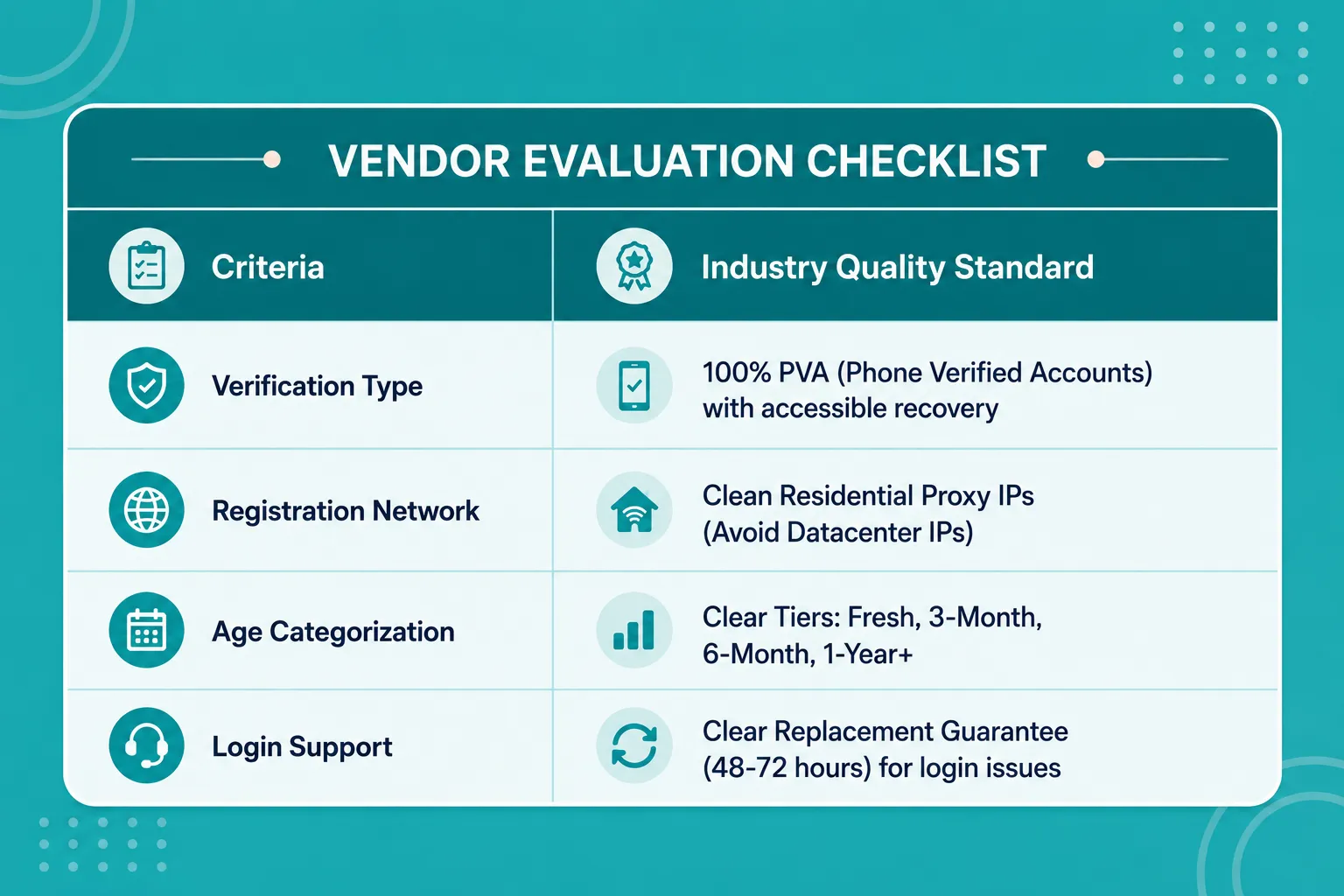
Not all account vendors follow strict quality standards. To protect your investment and maintain long-term operational stability, verify these factors before selecting a provider:
|
Feature |
Quality Provider Standard |
Red Flag / Low Quality |
|
Account Creation Method |
Created with clean, unique residential IPs |
Created via automated bot scripts on datacenter IPs |
|
Verification Status |
Fully PVA (Phone Verified Accounts) with recovery emails |
Non-verified or phone-prompted on first login |
|
Account Age Options |
Offers distinct tiers (Fresh, 3-Month, 1-Year+, Aged) |
Unclear account creation dates or misleading age claims |
|
Replacement Policy |
Clear 48-72 hour replacement guarantee for login issues |
No support or replacement terms once credentials are delivered |
Final Thoughts
Scaling business communication needs reliable infrastructure. Trying to handle high-volume outreach from one primary inbox or spending hours manually creating accounts slows growth and risks your main domain's reputation.
Buying Gmail accounts from a trusted provider gives you a flexible outreach network. Whether you run cold email campaigns, SEO link-building, or manage client assets, the right bulk setup helps you scale more efficiently.
Frequently Asked Questions
What does "PVA" mean when buying accounts?
PVA stands for Phone Verified Account. It means a unique phone number was used for Google's verification during setup. PVA accounts are generally more stable, less likely to hit login blocks, and ready for use sooner.
Will buying email accounts risk my main business domain?
Not if you use proper safeguards. Keep purchased accounts on secondary domains or as standalone profiles. Never run cold or high-volume outreach from your primary corporate domain.
How many emails should I send daily per account?
For cold outbound campaigns, stick to 30 to 50 emails per account per day. Spread higher volume across more accounts instead of increasing limits on individual ones. This helps deliverability and reduces the chance of spam filters flagging the accounts.
Why do aged accounts cost more than fresh ones?
Aged accounts need ongoing maintenance and time to build history. They usually carry more trust with email providers and place better in inboxes, so they cost more than newly registered ones.
What is the difference between residential and datacenter IPs?
Datacenter IPs come from cloud servers and are easier for spam filters to identify. Residential IPs come from regular consumer ISPs, so account activity looks more natural.
How long should I warm up purchased accounts before starting outreach?
Even with good aged or phone-verified accounts, run a gradual warm-up for 14 to 21 days. Slowly increasing volume builds consistent engagement patterns and supports better long-term inbox placement.